New: Mailamber 1.18.0for Windows · Android on Google Play
Your mail never touches our servers
The local-first email client for Windows and Android: Outlook and Hotmail in one click, step-by-step Gmail setup, read receipts ✓✓ and AI. Messages, passwords and attachments stay on your devices only.
Windows DPAPI on your PC, Android Keystore on your phone.
Direct, TLS-encrypted connection
You talk to your provider only: no cloud in between.
The best of Mailamber
The features that make people switch email clients
The mailboxes you actually use, connected in a minute. The replies you’re waiting for, under control. And AI that works for you without quietly reading your mail.
Read receipts
✓ sent.✓✓ read.
Know when your email gets opened, just like in a chat. Track from your PC and see the ticks on your phone, and vice versa; counting is precise, with no security scanners, bots or link previews. If they don’t reply, Mailamber reminds you; with Tracking Pro you also see link clicks.
Real-time notification on first open
Ticks shared between PC and Android
Reminder if they don’t reply
James Miller310:24
Partnership proposal 2027
Opened 4 times3 clicks
Email opened ✓✓Partnership proposal 2027
Outlook · Hotmail · Live · Microsoft 365
Hotmail and Outlook in one click
With “Sign in with Microsoft” you connect your mailbox through Microsoft’s official sign-in: no passwords to copy, no servers to configure.
Sign in with Microsoft
Gmail
Simple, guided Gmail
A step-by-step walkthrough helps you create a Google app password and connect your mailbox in a minute.
1Turn on 2-Step Verification
2Create an app password
3Paste it into Mailamber
Artificial intelligence
Free AI. Premium AI when you need it.
Nothing runs without your consent, and only for the features you use.
Free, on every plan
AI priority for uncertain messages
Smart spaces with AI assist
Free AI models
Only after your consent, never automatic
Plus and Premium
AI copilot in the composer: chat and quick actions
Proofreading with one-click fixes
Summaries, translations and quick replies
AI HTML templates, clear monthly limits
HTML email · PC and Android
Ready-made templates. Polished HTML emails.
Start from a gallery of 10 professional templates in 6 languages or build your own in Text, Visual or HTML, with a faithful preview on desktop and mobile, light and dark. Variables fill themselves in (recipient name, company, date) and templates stay synced across your devices. HTML editor on every plan, on PC and Android; with Plus and Premium, describe the template and AI builds it complete.
Gallery of 10 ready-made templates, in 6 languages
Variables with default values, filled in automatically
Complete AI-generated templates (Plus and Premium)
WindowsAndroid
HTMLCodePreview
Logo 180×60
What’s new in October
PhotoRead
PhotoRead
AI · Plus · Premium
Monthly newsletter: blue header, 2 articles with a Read button
Generate template
PEC
Certified email, made easy
Italian certified email (PEC) from Aruba, Legalmail, Postecert and more: acceptance and delivery receipts attached to each message.
Accepted09:12
Delivered09:13
Local-first
No server in between
Your email stays on your device, trackers are blocked and credentials live in the system keystore.
3trackers blocked
Windows + Android
One account. PC and phone.
Same plan and same features on Windows and Android, with rules, templates, signatures and preferences in sync.
Rules, templates, signatures, blocked senders, allowed images, spam senders and preferences stay in sync between Windows and Android through your Mailamber account, encrypted. Your emails and passwords don’t: they stay on your devices.
Rules
Templates
Signatures
Blocked senders
Allowed images
Spam senders
Preferences
PC and phone together from Plus (2 devices)
Fast sync
Huge mailboxes, ready right away.
Even with tens of thousands of emails, your inbox is ready in moments and older mail arrives in the background without slowing the app down. On PC, new messages arrive in real time with IMAP IDLE.
Inbox ready
Older mail in the background
New mail in real time
A closer look
See Mailamber in action
Every screen is rebuilt from the real app interface, with demo data. Pick a tab: light or dark follows your device theme.
Every mailbox, one view
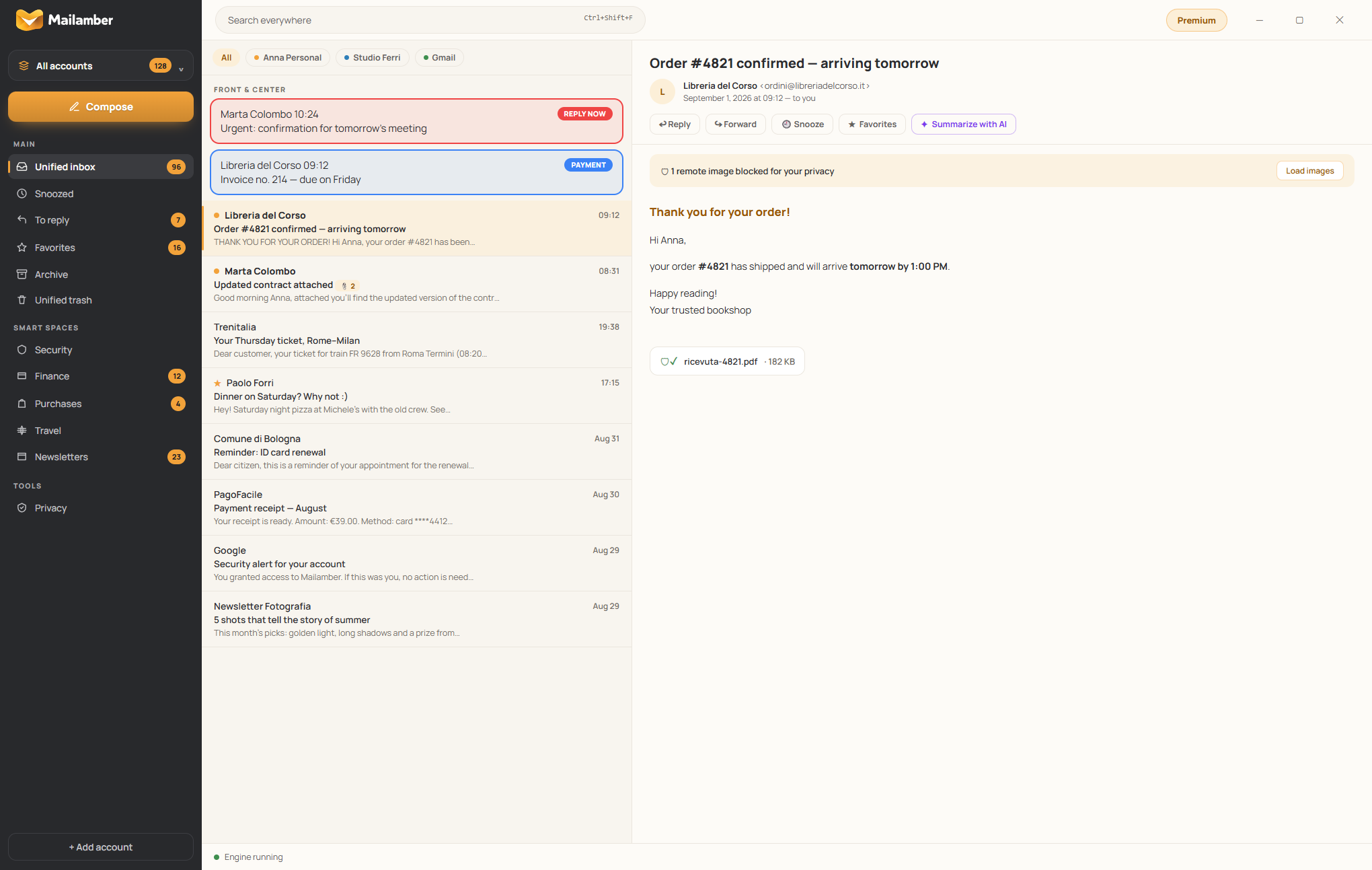
A sidebar with the account switcher, Compose and the Main, Smart spaces and Tools sections; a list with a color per account and an amber bar on unread mail; the reader on the right. At the top, Smart Priority puts what matters first.
Read without being watched
Trackers and remote images blocked before rendering, attachments checked before you open them and actions on a single row: Reply, Reply all and Forward on the left, Delete always in the same place on the right, the rest in the More menu.
Compose window with AI copilot and ✓✓
Every message opens in its own Windows window. The ✓✓ button turns on tracking, Template inserts a template and the AI sidebar helps with chat, quick actions and proofreading highlighted right in the text.
Ready-made templates, with variables
A library with search, favorites, categories and tags, plus a gallery of 10 professional templates in 6 languages. Variables fill themselves in, and from the composer you insert a template with the Template button or Ctrl+Shift+T.
HTML emails and AI templates, on PC and Android
Switch the composer to the HTML editor: code and a faithful preview, on PC and phone, on every plan. Save the layout as a reusable template and, with Plus and Premium, let AI build a complete template from a description.
Summaries and replies in one click
The AI summary tells you what matters in three lines, and quick replies offer three ready-to-polish answers. Only when you ask.
Know who read it and who clicked
In Sent, tracked emails show ✓ delivered, ✓✓ opened and link clicks (with Tracking Pro), the same on PC and phone. You get notified the moment they first open it; if they don’t reply, the bell reminds you.
Mail that sorts itself
Finance, Purchases, Travel, Events, Newsletters: smart spaces gather the right messages without moving anything on the server, and learn from your corrections.
Certified email with matched receipts
For Italian certified email (PEC): the certified message, acceptance and delivery receipts in one place, with the PEC tag in both the list and the reader.
Clear settings, saved instantly
Tidy sections — General, Appearance, Notifications, Mail, Privacy, AI — and every change confirms “Saved”. You also see how many tracked emails you’ve used this month.
Light, dark, in your language
Light, dark or system theme, five accent colors, comfortable or compact density and six languages you can switch with one click.
Your companion in your pocket
The Android app has the same unified inbox, ✓✓ read receipts, AI summary and local-first privacy. Same account, settings in sync.
1 of 12
{n} of {total}
Private by design
Local-first isn’t a slogan. It’s the architecture.
Many “modern” email apps route your messages through their own servers to process them. Mailamber doesn’t: the app talks directly to your provider and keeps everything on your device.
Email stays on your device
Messages and attachments are downloaded, indexed and stored in a local database, on your PC or your phone.
Direct TLS to your provider
Encrypted IMAP and SMTP, from your device to your provider. No Mailamber server in between.
No ads, no profiling
We don’t sell data and we don’t analyze your mail: you pay with a subscription, not with your information.
Credentials in the system keystore
Passwords and tokens protected by Windows DPAPI and the Android Keystore. They are never sent to us.
Where your email goes
Your PC or phone
Emails, attachments, passwords
Direct · TLS
Your provider
Outlook, Gmail, iCloud, IMAP
Mailamber servers (EU)
Account, plan and devices only · Your mail never passes through here
The only exception is transparent and optional: if you use AI, after your consent only the text that feature needs is processed — never stored, never used to train models.
Ambra is Mailamber’s little bee, with a honey-colored hood and a heart envelope always close at hand. She says hello when you arrive, celebrates an empty inbox with you, offers an idea when it helps and takes a rest when all is quiet.
Hi there! So good to see you.
Hover over a mood, or tap it, and watch her change.
What we believe in
Organize
with ease
Focus
on what matters
Breathe
a kinder internet
Belong
to a brighter you
A calmer inbox. A brighter you.
Android app
Mailamber is on Google Play
The PC app’s features, on your phone: your mail talks directly to your provider and stays on the device only — no relay servers, even on the go.
Sign in with Microsoft for Outlook and Hotmail, guided Gmail and any IMAP mailbox
Read receipts ✓✓ and tracked link clicks
Follow-ups, snoozes, rules and PEC with matched receipts
AI summaries and assistant to write and reply
Same account and plan as your PC, settings in sync
Scan the QR code with your phone camera to open the listing on Google Play.
Coming soon to Google Play
Features
Everything you expect from a serious client. Nothing you don’t need.
Built for people who live in their inbox: fast, quiet, respectful. The core features run locally, with no middlemen; AI is optional and only steps in when you decide.
Tracker blocking with counts
Tracking pixels and remote images are blocked before rendering and counted, message by message.
Checked attachments
A safety verdict BEFORE you open a file: local checks plus Windows Defender on PC, with a green/yellow/red badge. On every plan.
Two-factor sign-in (2FA)
Protect access to your Mailamber account with an authenticator app (Google Authenticator, Microsoft Authenticator…). Optional but recommended, turned on in a minute from your account area.
Sender blocking
One click on a message and that sender won’t bother you again: future messages go straight to Trash. Unblock instantly from Tools.
Snooze and follow-ups
A message disappears and comes back when you choose; and if one of your emails gets no reply, Mailamber reminds you.
Rules and templates
Sort mail automatically and insert your templates from the composer with the Template button or Ctrl+Shift+T, with signatures for each account.
Settings in sync
Rules, templates, signatures and preferences stay aligned between PC and phone with the same Mailamber account. Your emails don’t: they stay on your devices.
Drafts that follow you
Drafts save themselves to your mailbox’s Drafts folder: you’ll find them on PC, on Android and in any other connected app, with no duplicates. For private text, choose “Only on this device” in the composer and it stays off the server.
Built-in contacts
An address book that lives on your device: save a contact straight from the recipients field and autocomplete does the rest. One card per address, imports that merge instead of duplicating, and an address book check that finds invalid addresses, misspelled domains and duplicates to merge in one click.
Checks before sending
Before an email leaves, Mailamber checks it for you: a likely typo in the recipient’s domain (gmial.com → gmail.com), an attachment you mentioned but forgot, or template fields left empty. Fix it in one click, or send anyway.
Instant search
Local full-text index: results in milliseconds even on huge archives, with filters for sender, date and attachments.
Real-time mail
Native IMAP IDLE: messages arrive the instant they exist, and sync keeps up even with mailboxes holding tens of thousands of emails.
Add-ons available from your account area: Tracking Pro (€5.99/month, Plus and Premium) — unlimited tracked emails and reminders + link click tracking — and Extra devices (€1.99/month each, Premium only). Cancel anytime.Explore the add-ons →
FAQ
Honest questions, straight answers
Where is my email stored?
On your devices, and only there. Mailamber downloads it directly from your provider (IMAP over an encrypted TLS connection) and stores it in a local database on your PC or phone. Our servers don’t receive it, don’t read it and can’t read it.
Is Mailamber available for Android?
Yes. The Mailamber Android app is on Google Play, with the same account and plan as your PC: unified inbox, Sign in with Microsoft, read receipts ✓✓, follow-ups, snoozes, rules and AI. Rules, templates, signatures and preferences stay in sync between PC and phone; your emails don’t — they stay on each device.
Can I use Hotmail, Outlook or Microsoft 365?
Yes, with “Sign in with Microsoft”: connect Outlook.com, Hotmail, Live or a Microsoft 365 account through Microsoft’s official sign-in, with no password to copy and no servers to configure. It works on both the PC and the Android app.
Can I use Gmail?
Yes, in a simple, guided way. Mailamber walks you through it step by step: you turn on Google’s 2-Step Verification, create a 16-character “app password” and paste it into the app. In about a minute your Gmail or Google Workspace mailbox is connected, with no technical settings.
How do you make money if everything is local-first?
Through Plus and Premium subscriptions, transparently. We don’t sell data, we don’t show ads and we don’t analyze your mail: the only exception is the optional AI, which processes only the text the feature you use needs, after your consent. The business model is the price you see, nothing else.
What does the Free plan include, forever?
One email account with real-time sync, instant search, tracker blocking, attachment checks, Smart Priority, free AI for priority and smart spaces, 3 rules, 5 snoozes a month, 5 tracked emails ✓✓ and 5 reminders a month, and 1 device. It isn’t a time-limited trial: it’s free forever.
Is AI included in the Free plan too?
Yes. On Free, AI runs on free models and only after your consent: AI priority refines the tags of messages local rules can’t decide, and smart spaces AI assist recognizes uncertain senders. Plus and Premium add premium AI on cloud models: the AI copilot in the composer with proofreading, summaries, translation, quick replies and AI HTML templates; Premium adds a monthly limit almost 6 times larger.
Can I know whether my emails are delivered and read?
Yes: while you write, the ✓✓ button turns tracking on for that email; in Settings you can choose to have it start on (it’s off by default). Each tracked email shows ✓ on delivery and ✓✓ on open, the same on PC and phone, with a real-time notification on first open; counting excludes security scanners, bots and your own opens; you can also be reminded if no reply arrives within 24, 48, 72 hours or a time you choose. We never keep the recipient’s IP in clear or their device, only a pseudonym of the IP — it’s up to you to inform recipients where the law requires it. Monthly limits: 5 emails on Free (with the Mailamber signature), 500 on Plus, 1,000 on Premium; with the Tracking Pro add-on they become unlimited and link clicks are added.
What is the Tracking Pro add-on?
An optional boost for people who work with offers, quotes and clients: €5.99 a month (monthly only, cancel anytime), available on Plus and Premium. It unlocks UNLIMITED tracked emails and follow-up reminders and adds link CLICK tracking: see when and how many times your links are opened, with the counter right in the message list. You turn it on in a minute from your account area.
Is PEC supported?
Yes, as a first-class account. PEC is Italy’s certified email system: you receive and send PEC normally and, with Plus or Premium, you get full certification — acceptance and delivery receipts automatically matched to each PEC you send, dedicated notifications and a timeline in the reader, on PC and Android. Outside Italy, Mailamber simply works as a complete email client.
With your consent we use measurement tools (e.g. Google Analytics, Microsoft Clarity) to understand how the site is used and improve it. Without your OK, no non-essential cookie is set.Cookie policy